

Case details
The case details page puts everything the Legal Execution Department has announced about a case on one page: photos, property details, the auction schedule and the location. Every plan can see this page in full.
Open it with View details in the case list, from a pin on the map, or from a notification.
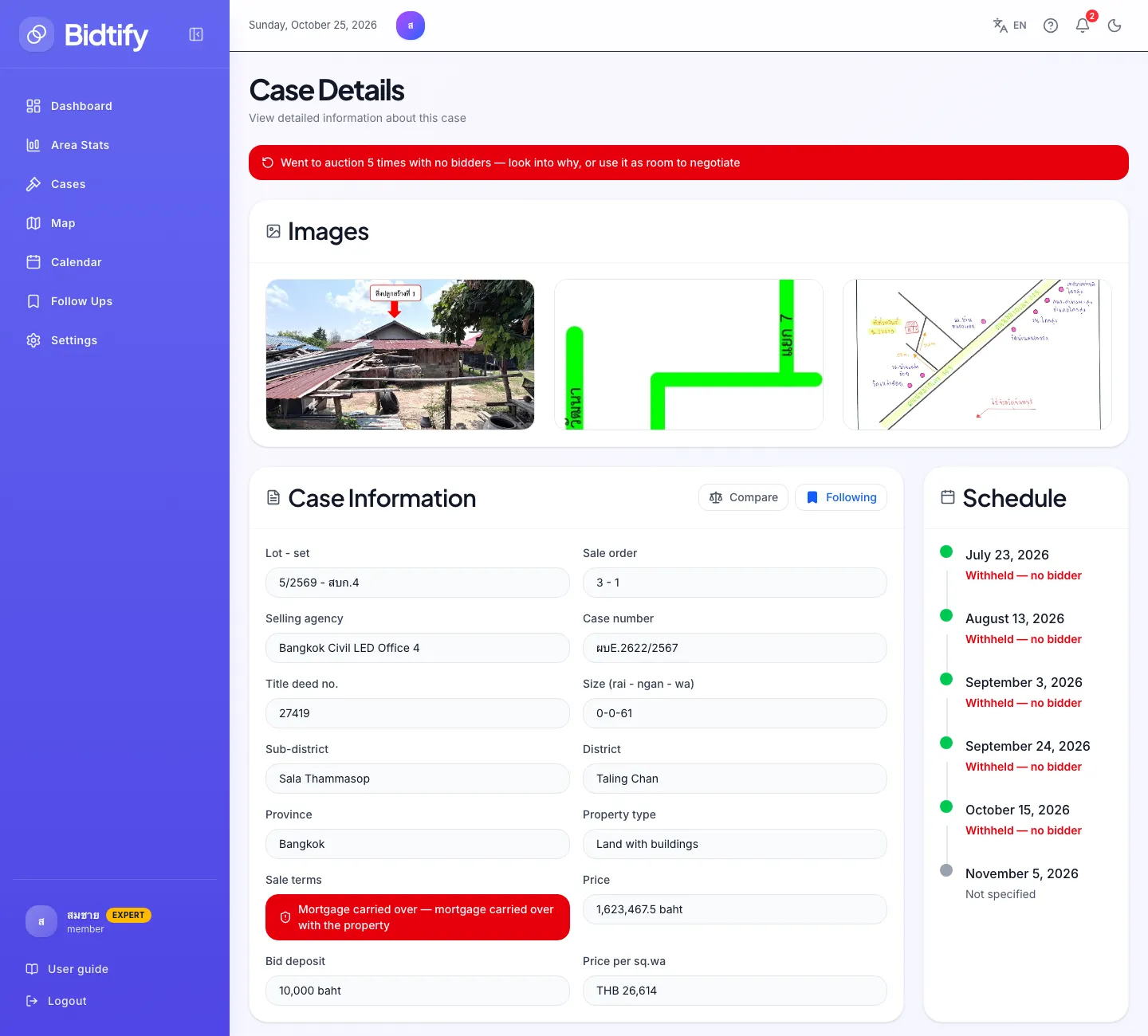
- Banner showing how many rounds had no bidder
- Compare and Follow buttons
- Mortgage terms; red means the mortgage is carried over
- Every auction round with its outcome
What does the coloured banner at the top mean?
Section titled “What does the coloured banner at the top mean?”If the case has had auction rounds with no bidders, a banner says “Went to auction N times with no bidders”. Amber is 1–2 times, red is 3 or more. Look into why, and factor it into your decision.
What does each field mean?
Section titled “What does each field mean?”| Field | Meaning |
|---|---|
| Lot - set | The lot and set numbers in the sale notice |
| Sale order | The case’s order on the auction day |
| Selling agency | The Legal Execution office selling the case |
| Case number, Title deed no. | References for the Legal Execution Department and the Land Department |
| Size (rai - ngan - wa) | Land area from the title deed (1 rai = 4 ngan = 400 square wa) |
| Price | The Legal Execution Department appraisal, not an actual sale price |
| Bid deposit | What a bidder must lodge as security; not an opening price |
| Price per sq.wa | Appraised price divided by area |
| Sale terms | Whether the property carries a burden, followed by “mortgage carried over with the property” or “no mortgage” |
Other terms are explained in the Glossary.
How do I view the photos?
Section titled “How do I view the photos?”The Images section shows the photos from the notice. Click a photo to enlarge it, and use the rotate buttons when the original is sideways.
How do I read the schedule?
Section titled “How do I read the schedule?”The Schedule section lists every auction round for the case by date, with the status of each round, for example cancelled for lack of bidders. The dot in front of each date shows when it falls:
| Dot | Meaning |
|---|---|
| Green | A past round |
| Red | Today |
| Orange | Within the next 1–7 days |
| Grey | More than 7 days away |
If no rounds are scheduled, it says No schedule available.
How do I see where the property is?
Section titled “How do I see where the property is?”The Location section shows a map with a pin. Click Open in Google Maps for directions; the latitude and longitude are shown for copying. Some cases also include the location plan from the notice.
Can I follow or compare a case from this page?
Section titled “Can I follow or compare a case from this page?”Yes. Two buttons sit above the property details:
- Compare adds the case to your comparison list (it shows In the comparison once added). See Compare cases.
- Follow saves the case to your followed cases (it shows Following once followed). See Followed cases.
At the bottom of the page is a checklist for checks before you bid. See Pre-auction checklist.