

Heatmap
The Heatmap turns the pins into a warm-to-cool colour layer so you can spot interesting neighbourhoods at a glance. Darker colour means a higher value for the layer you choose. Available from the Pro plan up.
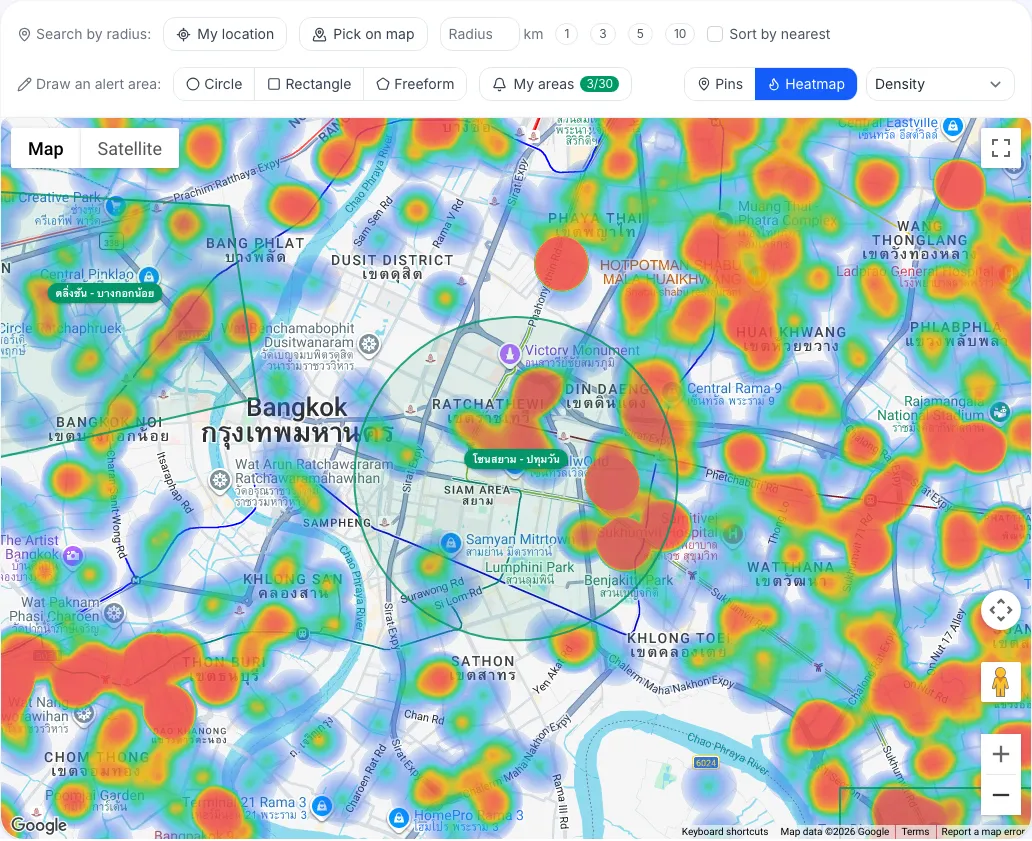
How do I turn on the heatmap?
Section titled “How do I turn on the heatmap?”- Switch the map from Pins to Heatmap.
- Choose a layer from the list next to it.
- Switch back to Pins to see individual cases.
What does each heatmap layer show?
Section titled “What does each heatmap layer show?”| Layer | Darker colour means |
|---|---|
| Density | Many auction cases in the area |
| Unsold | Cases with several no-bidder rounds; the more rounds, the more weight. Often room to negotiate |
| Cheapest (฿/sq.wa) | Low appraised price per square wa (cases with no price or area count at the lowest weight) |
The heatmap respects the filters in the Search panel. For example, filter to vacant land and use the Cheapest layer to find areas where land is appraised low.
What do I see on the Free plan?
Section titled “What do I see on the Free plan?”The Heatmap button has a padlock. Clicking it opens a dialog with a View Pro plans button.