

Radius search on the map
Search by radius shows only the cases inside a circle around a centre point: your own location, or any point you click, such as your office or a train station. Available from the Pro plan up.
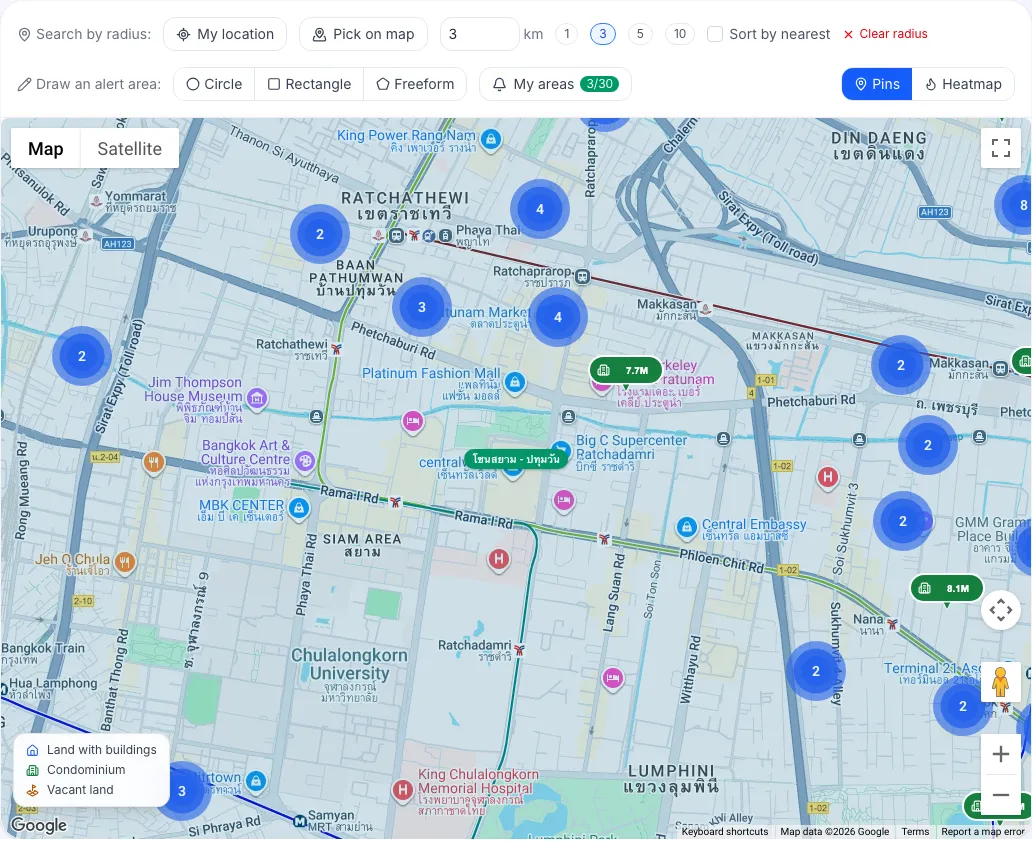
How do I search by radius?
Section titled “How do I search by radius?”- In the Search by radius: row above the map, choose the centre:
- click My location to use where you are (the browser asks for location access), or
- click Pick on map, then click the point you want on the map.
- Choose a radius in kilometres, or type a number in Radius.
- The map draws the circle and shows only the cases inside it.
Tick Sort by nearest to load the cases closest to the centre first. Click Clear radius to go back to all cases.
The other filters in the Search panel still apply, for example only condominiums within 3 km.
How is a radius search different from a circular alert area?
Section titled “How is a radius search different from a circular alert area?”- Radius search finds cases that exist now. It isn’t saved and doesn’t alert you.
- An alert area is saved to your account and alerts you when new cases appear inside it. See Draw alert areas.
What do I see on the Free plan?
Section titled “What do I see on the Free plan?”The Search by radius row is dimmed with a PRO badge. Clicking it opens a dialog with a View Pro plans button.